As previously announced, Autodesk will be discontinuing the sales of perpetual licenses for a number of individual products on 31st July 2016. Autodesk will also be discontinuing Design & Creation Suites, in addition to this.
A complete list of the products and suites that will be affected can be seen by following the link below.
Discontinued Perpetual Licenses and Suites List
Customers
will no longer be able to convert a standalone perpetual license to a shared
network license, or cross-grade to other perpetual licenses for products that
are no longer offered.
Customers who have a current Perpetual License Maintenance Plan, will still have the option to continue renewing this, as long as the Maintenance Plan is never allowed to expire.
For more information please contact nmichel@chempute.com

Wednesday, 20 July 2016
Monday, 11 July 2016
CAESAR II Statics Pipe Stress Analysis Training Course
Chempute Software is hosting
a CAESAR II Statics Pipe Stress Analysis Training Course that
addresses Static Analysis only.

No previous experience in the use of CAESAR is
required, but some background in pipe stress analysis is desirable. Persons attending the training should expect to leave
the course with a basic working knowledge of CAESAR II, and pipe flexibility
analysis.
Course Name: CAESAR II – Pipe Stress Analysis Using Caesar II - Statics Only
Duration:
5-days
CPD Points :
5 (Course Accreditation No: SAIMechE 0787-10/17)
Dates:
25-29 July, 2016
Course Times:
8:00 a.m – 4:30 p.m.
Location:
Chempute Software, Unit G14, Pinewood Square, Pinewood Office Park, 33 Riley Road, Woodmead, Sandton
Trainer:
Alan Stewart
Should you be interested in attending, please follow the link below to register.
Caesar II Statics Registration Form
Monday, 6 June 2016
CADWorx High Purity Content Pack Released
The Intergraph
Process, Power & Marine support team has posted a High Purity Content Pack
with High Purity Catalogs and Specifications updated for use with the latest
CADWorx 2016 capabilities. This Content Pack is now available for download from
Intergraph's Smart Support web site at https://smartsupport.intergraph.com.
To access this
Download:
1. Log on to Intergraph's Smart Support website using the above link.
2. Select "View Downloads".
3. Select "CADWorx Plant".
4. Expand the "Catalogs/Specification" Section.
5. Download the "HighPurityContent_05-05-16.zip" file.
For more information, please contact nmichel@chempute.com
Tuesday, 31 May 2016
Advance Steel 2017 Released
Autodesk has recently
released the latest 2017 version of Advance Steel, their flagship Structural
Modelling and Detailing solution, based on AutoCAD. Customers that are current
with Subscription/Maintenance can access this latest version from their Autodesk
Account.

Some of the new features include updated modelling and connection tools, enhancements to Documentation Bill of Material Templates and improved integration with other solutions.
For more information, see the link below.
Whats New in Advance Steel Premium 2017
Should you require any further information, please contact nmichel@chempute.com

Some of the new features include updated modelling and connection tools, enhancements to Documentation Bill of Material Templates and improved integration with other solutions.
For more information, see the link below.
Whats New in Advance Steel Premium 2017
Should you require any further information, please contact nmichel@chempute.com
Monday, 9 May 2016
Advance Steel Technical Checking Tolerances
Along with a Clash Check utility, Advance Steel Premium has an additional model validation tool that allows users to check if Bolts/Holes are too close to an objects edge or too close to each other. This assists the User in avoiding Tearout Stress later on site.

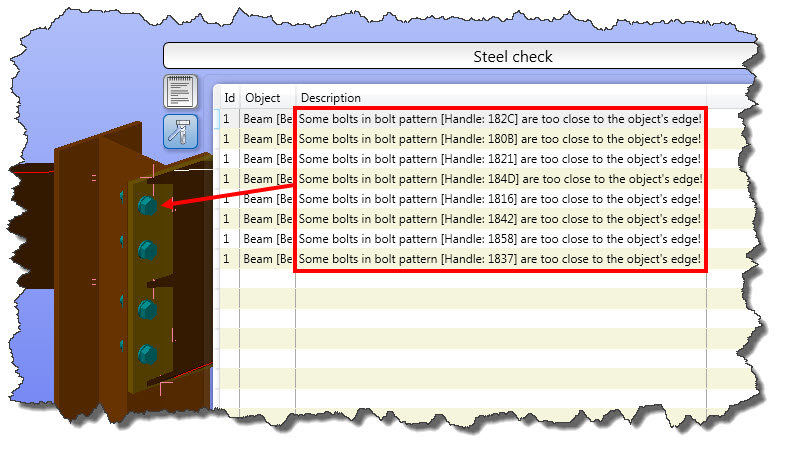
These minimum and maximum distances can often be slightly different from country to country and can even very from project to project as well. Advance Steel allows Users to completely control the tolerances for Technical Checking, ensuring that this utility validates the model as per a User's company preference.
The following tolerances can be configured for the Technical Checking utility:
- Edge Distances in X
Orientation.
- Edge Distances in Y
Orientation.
- Maximum Edge Distance
for Holes.
- Maximum Intermediate
Distance for Holes.
- Minimum Edge Distance
Factor for Holes.
- Minimum Intermediate
Distance Factor for Holes.
- Maximum Edge Distance
for Holes.
- Minimum Edge Distance
Factor for Holes.
Please follow the link below to download a PDF Tutorial on how to configure these tolerances in Management Tools
Should you require any further information please contact nmichel@chempute.com
Monday, 2 May 2016
CAESAR II Advanced Statics Pipe Stress Analysis Training Course
Chempute Software is hosting a CAESAR
II Advanced Statics Pipe Stress Analysis Training Course that addresses Advanced
Statics and Dynamic Analysis topics

Previous experience in Pipe Stress Analysis, plus experience in using CAESAR, or attendance of the Basic Statics Analysis Course is required. Persons attending the training should expect to leave the course with an advanced working knowledge of CAESAR II, and pipe flexibility analysis.
Trainer: Alan Stewart
Should you be interested in attending, please follow the link below to register.
Caesar II Advanced Statics Registration Form

Previous experience in Pipe Stress Analysis, plus experience in using CAESAR, or attendance of the Basic Statics Analysis Course is required. Persons attending the training should expect to leave the course with an advanced working knowledge of CAESAR II, and pipe flexibility analysis.
Course Name:
CAESAR II – Pipe Stress Analysis - Advanced Statics
Duration:
5-days
CPD Points :
5 (Course Accreditation No: SAIMechE 0786-10/17)
Dates:
16-20 May, 2016
Course Times:
8:00 a.m – 4:30 p.m.
Location:
Chempute Software, Unit G14, Pinewood Square, Pinewood Office Park, 33 Riley Road, Woodmead, Sandton
Trainer: Alan Stewart
Should you be interested in attending, please follow the link below to register.
Caesar II Advanced Statics Registration Form
Tuesday, 26 April 2016
Creating Prefix Configuration Profiles in Advance Steel Premium
Advance Steel Premium allows Users to create different Prefix Assignment Profiles for the User's different customer requirements.

This means that Users can ensure that Prefix Configuration Standards for their customers can be quickly applied without having to reconfigure the entire Prefix Configuration with every new project.
Prefix Assignment Profiles can easily be created and switched between, just before the numbering process takes place.

Please follow the link below to download a PDF Tutorial on how to create Prefix Configuration Profiles in Advance Steel Premium.
Using Different Prefix Assignment Configuration Profiles for Different Clients FAQ.pdf
Should you have an further queries please contact nmichel@chempute.com

This means that Users can ensure that Prefix Configuration Standards for their customers can be quickly applied without having to reconfigure the entire Prefix Configuration with every new project.
Prefix Assignment Profiles can easily be created and switched between, just before the numbering process takes place.

Please follow the link below to download a PDF Tutorial on how to create Prefix Configuration Profiles in Advance Steel Premium.
Using Different Prefix Assignment Configuration Profiles for Different Clients FAQ.pdf
Should you have an further queries please contact nmichel@chempute.com
Subscribe to:
Posts (Atom)